Over the past few years I’ve built and worked with a few different approaches to allowing users to write and execute code within a web application. A simple and ubiquitous example of this would be the filtering functionality on a page showing a data table, where users can create predicates, combine them together with boolean operators and then see only the data that matches the filter query. Another common example is in workflow builders in which end users can build their own processing pipelines, that might take a webhook payload as input before parsing out and transforming the fields of interest. The example below is from incident.io’s product, a very powerful query builder that I got to work on during my time there. In this example it’s taking a webhook payload as input before parsing a typed Team from the payload, or if that fails parsing a Service then grabbing a Team from that. It’s extremely flexible and gives users a very visual way to build workflows that suit their needs.
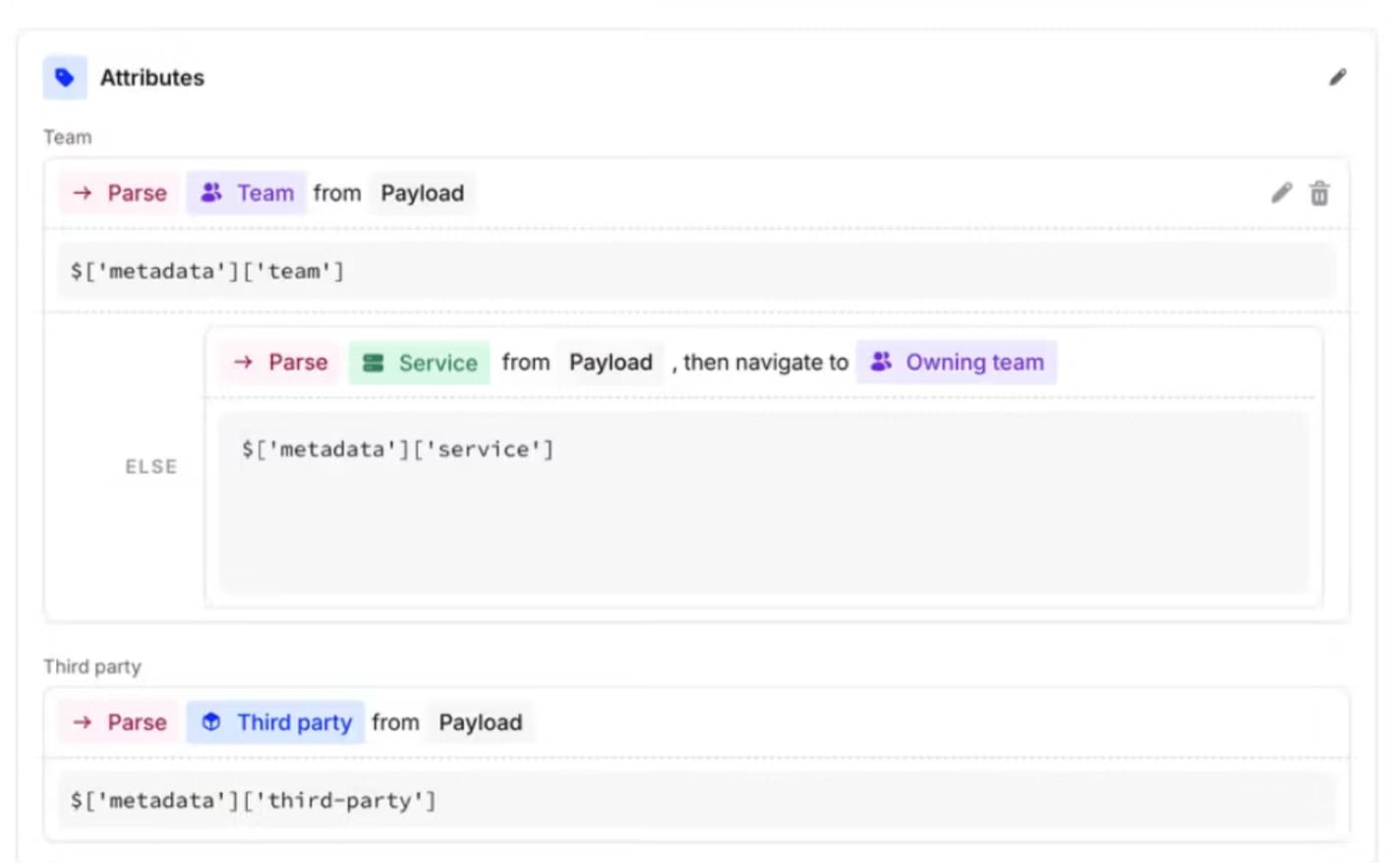
It’s become common in lots of products to allow users to enter arbitrary JS queries in the place of query builders like this. It allows the ultimate in flexibility but comes with a number of significant downsides:
- It’s a very poor user experience for non-technical users who don’t have time to learn to code to achieve their goal ( moderated somewhat by the arrival of LLM tools)
- Allowing arbitrary code execution brings significant security risks that can be tricky to mitigate (e.g. code that never terminates)
- It’s much harder to reason about what the code is doing, making it difficult to show a visual representation of it in the UI, and difficult to give users compile-time information about what their code will do.
Statically-typed languages with generics are a great way to represent these computations in code and the Kotlin type system makes it easy to build, serialise and introspect them. This article is the first in a series showing a how I’ve implemented a simple DSL (called Machine) that has formed the basis of such a system in products that I’ve built (most recently in Nanumo). In this piece I’ll cover the basic building blocks and in the next pieces I’ll show it’s easy to wire this up to an easy-to-use front end and also how these building blocks can be extended to allow them to execute in the database allowing for safe, high-performance execution.
Basic types
Part of what makes the incident.io query builder so easy to use for non-technical people is that it’s statically typed. The query builder knows at all times what types it’s working with,and as a result it can steer the user in the right direction. For example, the user will never be allowed to parse a number out of an email field or compare a date with an ID. This DSL will be strongly typed and we’ll encode the DSL types in the Kotlin type system. The base type system looks like this:
sealed interface MachineType<R> {
    fun typeName(): String
    fun value(): R
}

sealed interface MachinePrimitive<R> : MachineType<R> {
    val value: R
    override fun value() = value
}

@JvmInline
value class MachineString(override val value: String) : MachinePrimitive<String>, Expression<MachineString> {
    override fun typeName() = "string"
    override fun invoke() = this
}

@JvmInline
value class MachineInt(override val value: Int) : MachinePrimitive<Int>, Expression<MachineInt>,
    MachineComparable<Int> {
    override fun typeName() = "int"
    override fun invoke() = this
}

// ... etc. for Booleans, Longs, Doubles,

interface Expression<R : MachineType<*>?> {
    operator fun invoke(): R
}
All types inherit from MachineType<R> which functions as a container for an underlying value, tagged with a name.
Primitives inherit from MachinePrimitive<R> and are value classes that represent underlying primitive types. An
instance of a type is instantiated like this val aString = MachineString("This is a string").
In addition we can define maps and arrays as compound types that look like:
data class MachineMap<T : MachineType<*>>(val typeName: String, private val value: Map<MachineString, T?>) :
    MachineType<Map<MachineString, T?>>, Expression<MachineMap<T>> {

    override fun typeName() = "array[${value::class.typeParameters[0]}]"
    override fun value() = value


    override fun equals(other: Any?): Boolean {
        if (this === other) return true
        if (other !is MachineMap<*>) return false
        return this.value == other.value
    }

    override fun hashCode() = value.hashCode()
    override fun invoke() = this
}

data class MachineArray<T : MachineType<*>>(private val value: List<T>) : MachineType<List<T>>,
    Expression<MachineArray<T>> {
    override fun typeName() = "array[${value::class.typeParameters[0]}]"
    override fun value() = value


    override fun equals(other: Any?): Boolean {
        if (this === other) return true
        if (other !is MachineArray<*>) return false
        return this.value == other.value
    }

    override fun hashCode() = value.hashCode()
    override fun invoke() = this
}
It’s worth noting that these are generic. They’re parameterised with another MachineType such that an array (or the
values of a map) can contain only one type. That’s it for the basic types. Using Jackson to serialise an array of
strings to JSON yields:
{
  "value": [
    {
      "value": "String A",
      "typeName": "string"
    },
    {
      "value": "String B",
      "typeName": "string"
    },
    {
      "value": "String C",
      "typeName": "string"
    }
  ],
  "typeName": "array[string]"
}
which is easy to work with on the frontend, to store and to deserialise back into statically-typed Kotlin objects (e.g. after a computation has been created in the UI and has been sent back to the application).
Expressions
With a basic type system in place, we now need a model of computation. We’ll build an Abstract syntax tree which along with types, has Expressions at the core. These represent a unit of computation that can be stored, composed and executed. The Expression interface is very simple:
interface Expression<R : MachineType<*>?> {
    operator fun invoke(): R
}
and provides a single invoke() function that yields a MachineType. You will have noticed that all the types above
are expressions, which means that we can do something like MachineInt(3)() which will create an int with value 3 and
then immediately evaluate it to get the output 3. In our DSL (similar to Lisp/Rust/Ruby), everything is an
Expression and can be evaluated to get a value.
Functions
We now have the ability to create instances of types and evaluate them. The next critical component are functions. These allow us to start doing actual computation on data and are the composable structures that allow us to build useful things. The simplest function takes no parameters and returns a value:
interface Fun0<R : MachineType<*>> : MachineType<Fun0<R>>, Expression<R> {
    override operator fun invoke(): R
}
One thing to note is that as well as being an Expression, it’s also a type in its own right. This allows us to pass
functions around as first-class entities and will let us power functional constructs like mapping and filtering over
collections. We extend this pattern for functions of n variables:
interface Fun1<A : MachineType<*>, R : MachineType<*>> : MachineType<Fun1<A, R>>, Expression<R> {
    var arg0: Expression<A>?
    override operator fun invoke(): R
}

interface Fun2<A : MachineType<*>, B : MachineType<*>, R : MachineType<*>?> : MachineType<Fun2<A, B, R>>,
    Expression<R> {
    var arg0: Expression<A>?
    var arg1: Expression<B>?
    override operator fun invoke(): R
}

fun <R : MachineType<*>> Expression<R>?.get(): R = this?.let { it() } ?: throw MachineException("arg not bound")

// etc.
The .get() function is just shorthand for accessing arguments and making sure they’re not-null at runtime. We can
implement some simple string functions thusly:
// Generating a random string
class RandomStringFun() : Fun0<MachineString> {
    override val typeName: String = "RandomStringFun"
    override fun value(): Fun0<MachineString> = this
    override fun invoke() = MachineString("${UUID.randomUUID()}")
}

// Joining two strings
data class ConcatStrings(
    override var arg0: Expression<MachineString>? = null,
    override var arg1: Expression<MachineString>? = null
) : Fun2<MachineString, MachineString, MachineString> {
    override fun invoke() = MachineString(arg0.get().value() + arg1.get().value())
    override val typeName = "ConcatStringsFun"
    override fun value() = this
}
For (n>0)-ary functions, arguments take the form of Expression<T>? instead of MachineType. This is an important
point as it allows for deferred computation. I can create a concatenation function without binding any arguments to it,
pass it around, compose it with other functions, store it in a database, retrieve it and then execute it later if
required:
fun main() {

    val concat = ConcatStrings()

    val randomString0 = RandomStringFun()
    val randomString1 = RandomStringFun()
    val randomInt0 = RandomIntFun()

//    Here we're composing functions
    concat.arg0 = randomString0
    concat.arg1 = randomString1

//    Note that this won't compile as the Kotlin type system knows that `RandomIntFun() returns an Int, not a String`
//    concat.arg1 = randomInt0

//    At this point we could store the graph, modify it or transmit it somewhere else if we want
    println(jacksonObjectMapper().writeValueAsString(concat)) // Prints {"arg0":{"typeName":"RandomStringFun"},"arg1":{"typeName":"RandomStringFun"},"typeName":"ConcatStringsFun"}

//    When we're ready we can evaluate it, at which point all of the expressions in the graph are evaluated
    println(concat()) // Prints MachineString(value=fac29640-bf3f-4c8a-ba7c-bfd1355df83ca2fb33e1-3eae-4d9b-9b1c-ad96c016af3a)
}
When we create a function, we’re creating a node in the computation graph. By combining nodes we can create arbitrarily
complex computations that we can then introspect, transmit, or store, before executing them (concat()).
Inputs
Computer programs aren’t very useful unless you can provide input to them. One simple way to do this is via a
GlobalVariable function that models taking inputs from a map of global variables:
class GlobalVariable<R : MachineType<*>>(
    override var arg0: Expression<MachineString>? = null
) : Fun1<MachineString, R> {
    override fun invoke(): R {
        variableMap[arg0.get()]?.let { return it as R }
        throw MachineException("Variable not found: ${arg0.get().value()}")
    }

    override val typeName = "GlobalVariableFun"
    override fun value() = this

    companion object {
        val variableMap: MutableMap<MachineString, MachineType<*>> = mutableMapOf()
    }
}
We can now set variables in our program, compose them together with other functions and see them evaluated at runtime:
fun main() {

//    Create a global variable called `name`
    GlobalVariable.variableMap[MachineString("name")] = MachineString("Henry")

// Use the global variable `name`
    val var0 = GlobalVariable<MachineString>(MachineString("name"))
    val concat = ConcatStrings()

    concat.arg0 = MachineString("Hello, ")
    concat.arg1 = var0

    println(concat()) // prints MachineString(value=Hello, Henry)
}
For next time
This forms the basis of our deferred computation system that will power the system described in the introduction. In a few hundred lines of code we’ve built a system that can operate on computations themselves in a way that’s typesafe, easy to extend and easy to work with.